
Changelog

Latest updates and improvements in the subscriber preferences category.

Follow us on X

All changelog posts

  • <Subscription /> component

    Give users control over what notifications they receive - at the topic level. Create subscribe/unsubscribe flows that fit the context. Set workflow preferences and use advanced conditional rules. All of this can be done with a customizable React component.

    Authors:
    Paweł TymczukGeorge DjabarovAdam Chmara
    Paweł T., George D., Adam C.
    Cover
    Requirements

    v3.12.0 or higher

    We've introduced Subscriptions, a new way to manage notification delivery at the topic level. Now with full context-awareness, giving subscribers precise control over what they receive and when.
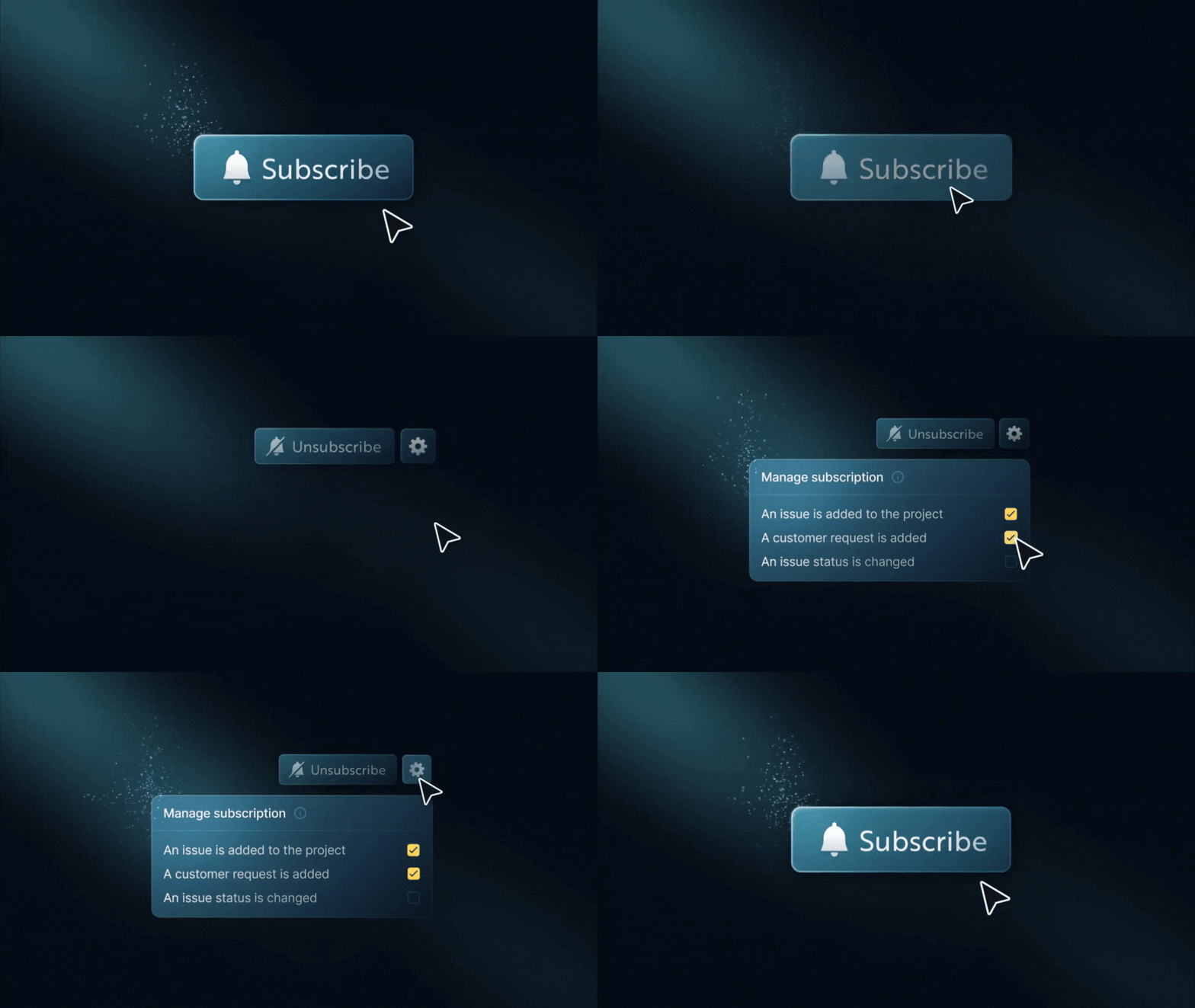
    States of <Subscription /> component

    The new <Subscription /> React component makes it easy to add subscription features to your app. You can use it for a simple “follow” button on a resource or a complete preferences view.

    Breakdown of the <Subscription /> component
    • Subscribe or unsubscribe to topics (e.g., projects, issues)
    • Enable or disable specific workflows within a topic
    • Support conditional delivery rules (e.g., owner-only, thresholds, filters)
    • Context-aware preferences: manage subscriptions differently across environments, tenants, or custom contexts using contextKeys
    • Multiple subscriptions per topic with different conditions
    • Fully customizable UI with theming, localization, and headless hooks
    • Works seamlessly with Inbox and existing workflow/global preferences

    Previously, subscribers could only control notifications at the workflow or channel level.

    Subscriptions now unlock:

    • Topic-level muting (e.g., turn off updates for project:43)
    • Context-scoped preferences: filter and match subscriptions by context, with behavior safely gated behind the feature flag
    • Advanced, structured preferences stored as JSON conditions
    • Contextual subscription management directly on entities like projects or tasks
    Read more

    Behind the scene, we've added robust support for contextKeys throughout the inbox and subscription modules. Sorted for consistency, validated across commands, and integrated into identifier logic for uniqueness.

    This lays the groundwork for granular notification preferences in multi-context environments while maintaining backward compatibility when context features are disabled.

    Learn more about <Subscription /> component

    Improvements (5)
    • Removed the default custom font URL from block-based email content. Now, it uses system default fonts instead.
    • Subscriber preferences now support context-aware binding. You can set and retrieve preferences for specific contexts, such as tenants or environments. If there's no context-specific value, it will use the global preferences instead.
    • Pagination preferences now persist across sessions. When you change how many items show per page, it saves your choice. The next time you visit, your selection will be restored.
    • Webhook messages now include workflow and step identifiers. Each webhook payload now includes workflowId and stepId. This gives you better context for tracking and routing events.
    • You can now configure digest lookback windows directly in the workflow editor. When digest mode is on, you’ll find new options for how far back to look. You can pick from quick presets: immediately, 5 minutes, or 30 minutes. You can also enter a custom value.
    Fixes (1)
    • Fixed the problem where duplicating a workflow didn't copy schema fields. This includes payloadSchema, validatePayload, and severity. These properties are now correctly preserved when workflows are duplicated.
  • Notifications Schedule

    Subscribers can set weekly schedules for their notifications. Messages sent outside these times will be suppressed. But critical alerts will still be delivered. You can manage schedules through API, SDK, or Dashboard. The smart workflow delivery waits for subscribers to be available.

    Cover
    Note

    Requires <Inbox /> version 3.10.1 or higher

    Give your subscribers control over when they receive notifications with customizable availability schedules. Subscribers can set their preferred hours for notifications. The system will then block messages sent outside those times. This helps them balance work and life. It also makes sure they always get important alerts.

    Weekly Schedule Configuration

    Subscribers can create a full weekly schedule right from their inbox settings. They can pick the days and times they want to get notifications. Subscribers can set their availability from Monday to Friday, 9 AM to 5 PM. The system will then ignore notifications sent by email, push, SMS, or chat outside these hours. Time ranges are set in 30-minute increments. They follow the subscriber's time zone. For example, a user in Europe/Warsaw gets notifications only during their local hours.

    Availability Preferences

    Copy Schedule Across Days

    With the copy feature, you can set up the same schedule for multiple days. Subscribers can set their Wednesday hours from 8 AM to 4 PM. With one click, they can easily apply those hours to Monday, Tuesday, Thursday, and Friday. There is no need to configure each day individually.

    Copy availability to other days

    Multiple Time Ranges Per Day

    Subscribers can set several availability windows for one day, which helps them manage complex schedules. For example, a person may be free for morning updates from 8 AM to 10 AM or from 1 PM to 5 PM. They won’t send notifications during lunch or meetings.

    Smart Workflow Delivery

    The system evaluates availability at the exact moment of delivery for each workflow step, which means notifications in multi-step workflows adapt dynamically to subscriber schedules. A workflow with a delay step could still be delivered successfully if the subscriber returns to their availability window when the delay is complete.

    Smart Workflow Delivery

    You can also configure digest and delay steps to automatically extend until the subscriber is back within their scheduled hours, ensuring messages are delivered when they're most likely to be seen.

    Critical Notifications Always Deliver

    Workflows labeled as critical—like security warnings, billing failures, or system alerts—go straight to delivery. This means urgent messages arrive right away, without any delays.

    In-app notifications always come through, no matter the schedule settings. They don't interrupt subscribers, so users can check them whenever they want.

    Full Management Control

    Subscriber schedules can be managed through the API and SDK. You can also view and edit them directly from the Dashboard. You can set a default schedule for subscribers who haven't set their own.

    Notification schedule dashboard management

    This eliminates the need for migrations for existing users. The activity feed logs when notifications are missed due to scheduling limits, making it easier to fix delivery issues and understand user actions.

    The new useSchedule hook in the React SDK provides the subscriber's current schedule and an update function, making it easy to create custom schedule interfaces.

    Check the documentation to explore the available configurations for setting up the notification receiving schedule (subscriber availability preferences).

    Improvements (2)
    • Translations CLI Integration: The CLI lets you easily sync translations by pulling them from Novu Cloud to your project and pushing updates back with simple commands.
    • Translations API