How to run one Vercel AI SDK agent across multiple channels
Use Novu Connect to bring an existing Vercel AI SDK agent to Slack, Microsoft Teams, WhatsApp, Telegram, iMessage, email and more while keeping its model, tools, and instructions in your application.


Key takeaways
Keep the agent you already built.
There is no need to rewrite it. Wrap your existing AI SDK generateText handler with the Novu adapter and bring it to chat channels.
Reach every channel with one agent.
The same agent can serve users across Slack, Microsoft Teams, WhatsApp, Telegram, and email—without a separate rewrite for each channel.
Skip the channel-by-channel setup.
npx novu connect provisions credentials, identity, and delivery, so you do not have to wire OAuth flows and webhooks by hand.
Keep humans in control of sensitive actions.
Set needsApproval: true to show Approve and Deny directly in the channel, then resume the agent’s turn after a decision.
Let Novu handle the communication layer.
Your agent keeps the model, tools, instructions, and reasoning. Novu acts as the ACI bridge that moves messages between the agent and each channel.
Build on an open-source foundation.
The Novu infrastructure connecting your agent to these channels is open source.
From One Agent to Multiple Channels
- 1
A working AI agent
You built an agent with the Vercel AI SDK. It reasons well, calls its tools, and holds a real conversation.
- 2
The obvious next step
Can we bring it into Slack? And Teams? And WhatsApp, for the customers who live there?
- 3
The multichannel workload
Doing so introduces another set of work: OAuth per platform, webhook endpoints, message formatting quirks, and some way to remember who said what on which channel.
We built the @novu/framework/ai-sdk adapter so you can skip that detour, it connects your existing agent to Novu Connect. You keep the model, instructions, and tools in your application. Novu receives messages from the channel, forwards the conversation to your agent, and delivers its reply to the right channel.
In this guide, you will connect a support agent to Slack, give it read-only access to Linear through MCP, and require approval before it issues a refund. You can then connect other supported channels without creating another AI SDK handler.
What changes when you take an AI SDK agent multichannel?
Your model, instructions, and tools do not need to change. The new work sits between the user and the agent: receiving provider events, resolving identities, maintaining threads, loading conversation history, rendering interactive messages, and sending replies in the right format.
Novu Connect handles that communication path. Your application remains responsible for the agent’s reasoning and actions.

What you will build
You will build a support agent that can answer questions using recent conversation history. It will also have two tools:
- A read-only Linear MCP connection for looking up a reported bug or feature request.
- A local refund tool that requires the user to approve the action before it runs.
We will connect Slack first because it gives us a quick way to test the complete message flow. After that, you can link Microsoft Teams, WhatsApp, Telegram, or email to the same agent.
Prerequisites
Before you begin, make sure you have:
- A Novu account.
- Node.js 22 or later.
- A Slack workspace where you can install apps.
- An Anthropic API key. You can use another AI SDK model provider and adjust the example.
- A Linear API key with read-only access.
For the Linear example, use the read-only MCP endpoint and a token that has only the permissions the agent needs. Do not expose either credential to the client. If you already have a working Vercel AI SDK agent, skip to Connect your existing agent with Novu.
Part 1: Build an agent to test with (skip if you have one)
The point of this guide is the multichannel step, not the agent. So this part stays small: an agent that can read your Linear issues, running from your terminal, with no tools to hand-write. If you already have an AI SDK agent, jump to Part 2.
- 1
Scaffold the project
Create a project and install the dependencies below:
- 2
Add your keys
Create a Linear API key under Settings, Security and Access in Linear, then create a
.env: - 3
Write the agent
Create
agent.ts. It connects to Linear’s MCP server, pulls in the tools, and hands them to the model. - 4
Run it
Run the script from your terminal to confirm the agent responds correctly before connecting any channel.
You should see your own Linear issues summarized in the terminal. That is the checkpoint: a working agent, before any channel enters the picture.

Part 2: Put that agent on a channel
Now the actual point of the guide. Connecting your Vercel AI SDK agent to a real channel, using the Novu connect CLI command. The command handles credentials and a bridge handler to expose your agent to Novu.
If you run the command in a project with an agent, Novu does not try to rewrite your app around a framework it cannot safely infer. Your route structure, imports, file names, and conventions might be specific to your codebase.
Instead, Novu provides you steps to manually set it up and also a ready-to-paste prompt that you can paste into your coding agent, the prompt describes exactly what setup is required for your project. This is the fastest path.
- 5
Run Novu connect
Run the Novu CLI from the root of your existing project to start an interactive setup flow:
Novu CLI signs you in, connects the selected agent to the channel you picked, adds the Novu credentials to your project, then it scans your project and prompts you to install the packages you need (If you do not yet have them installed).
After installing the packages the CLI provides a ready-to-paste prompt describing exactly what needs to be configured into your project. If you’re working with a coding agent, such as Claude Code, Cursor, or Codex, then copy that prompt into it. This is the fastest path.
If you want to connect it manually instead, then continue with the next steps.
- 6
Move your agent into a bridge handler
Create
novu/agent.ts, and then move your agent logic from Part 1 in, calling it fromonMessageinstead of a standalone function.Two things worth noticing. Your
generateTextcall is the same one from Part 1. AndtoModelMessages(ctx.history)hands the model the whole conversation as it happened, already mapped from whatever channel it arrived on, so you are not storing or reshaping history yourself. ctx.history already includes the current inbound message, so there is no separate message to append.Returning
generateText(...)fromonMessageis enough. Novu delivers the result to the channel, with no separate send step. - 7
Expose the bridge endpoint
Novu reaches your agent through one HTTP endpoint (
/api/novuby default). Expose it with theservewrapper for your framework. For Next.js: - 8
Test the full loop
Run the CLI’s dev command to tunnel your local server and test the full flow end to end.
Now message the channel you connected. On Slack, for example: “What issues are assigned to me in Linear?” You should get the same answer Part 1 printed to your terminal, this time in the channel, in a real conversation.

Add human approval for sensitive tools
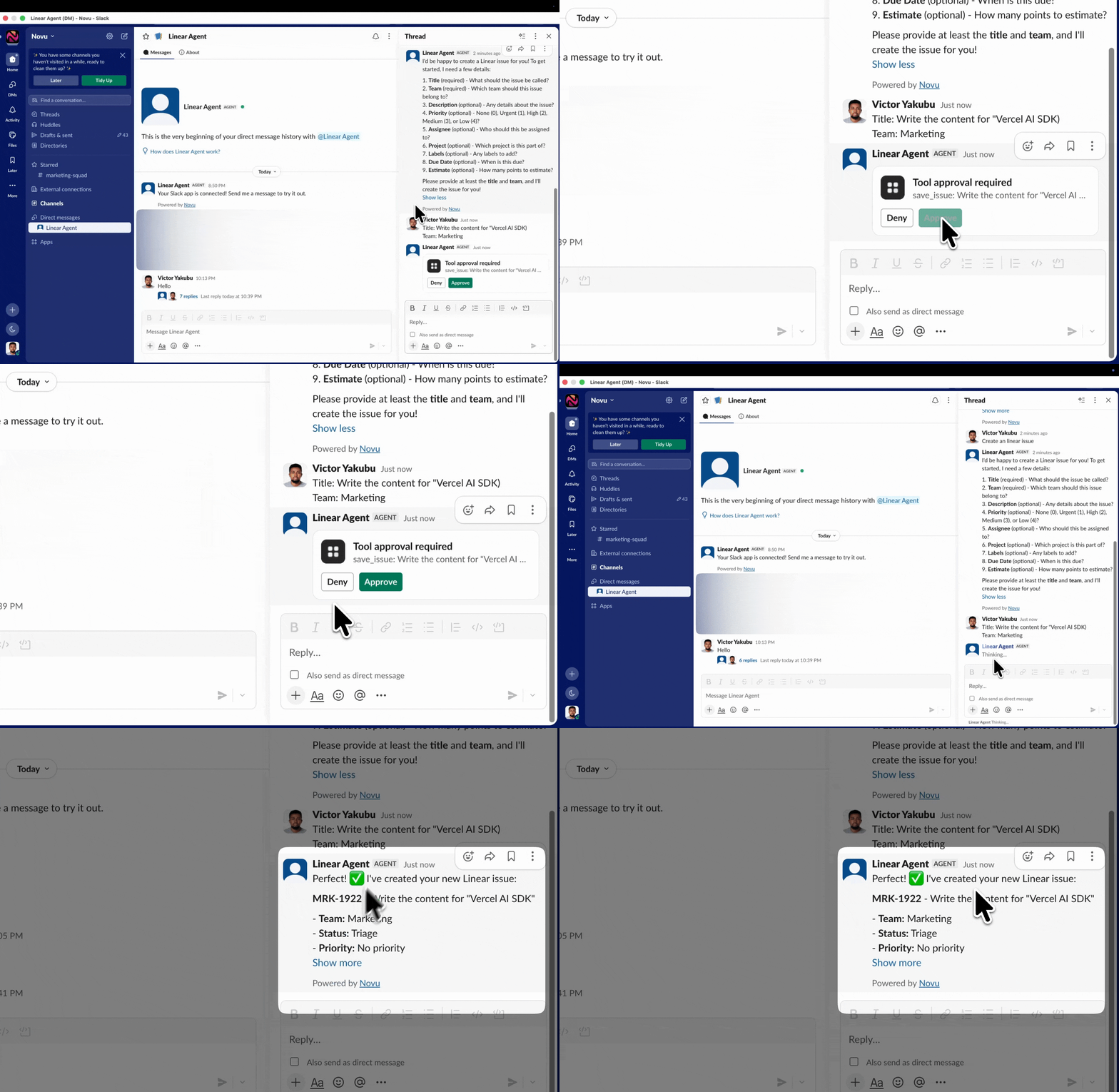
You can add tools approval for certain tool calls such as creating, closing, or reassigning Linear issues so that a person confirms them first before it runs. For any tool you define, set needsApproval: true, and Connect shows Approve and Deny in the channel, then resumes the turn once the person chooses.
Add that tool alongside the Linear MCP tools in your generateText call. When the model decides to create an issue, the person in the channel sees the proposed action and approves or denies it before anything runs. The turn picks up from there.
Bring your AI SDK agent to your users
Your Vercel AI SDK agent can keep its model, instructions, local tools, and MCP connections inside your application. Novu Connect provides the communication path that receives user messages, passes conversation history to the agent, renders approvals, and delivers replies across supported channels.
Start with Slack, test the complete flow, then connect the other channels your users already rely on.