Human-in-the-loop approval for a LangChain agent in Slack
Connect your LangChain email agent to Slack with Novu Connect and add human-in-the-loop approval to review email drafts before sending.


While reading LangChain’s guide to building an agent, I wondered how I could bring its email-agent example into Slack and review outgoing emails there before they were sent.
The guide includes human review before sending an email. You’ll build a small version of that workflow with Novu Connect. You’ll ask a TypeScript LangChain agent to send an email, review the proposed recipient and message in Slack, and approve or deny the send.
The email tool is mocked, so you can test the approval flow without connecting an email provider.
Key takeaways
Keep your LangChain logic in your application.
The model, instructions, tools, credentials, and business logic stay in your application. Novu Connect handles the conversation and approval flow between the agent and Slack.
Gate the action, not the conversation.
Use needsApproval to pause sendEmail only when the agent is ready to send. Drafting, revisions, and ordinary replies can continue without approval.
Review the complete email in Slack.
Show the proposed recipient, subject, and body in a native approval card. The reviewer can approve or deny the action without leaving the Slack thread.
Resume the agent automatically after a decision.
Novu records the decision in ctx.history and invokes onMessage again. LangChain continues the tool loop, running sendEmail only after approval.
Extend the same approval flow beyond Slack.
The same pattern works across Microsoft Teams, WhatsApp, Telegram, email, and Agent Chat, using the native controls available in each channel.
What it takes to add human approval to a LangChain agent
- 1
Keep the agent logic in your application
Your application continues to own the model, instructions, tools, credentials, and business logic. LangChain drafts the email and proposes the
sendEmailaction without requiring a separate Slack-specific agent. - 2
Let Novu Connect handle the approval loop
Novu Connect pauses the proposed
sendEmailcall and shows the recipient, subject, and body in Slack. After the reviewer approves or denies the action, Novu records the decision and resumes the agent. The tool runs only after approval.
What you will build
You’ll start with an existing Next.js application and add a small LangChain email agent. The finished interaction works like this:
- You ask the agent in Slack to send an email.
- LangChain drafts the email and calls
sendEmailwith the recipient, subject, and body. - Novu Connect posts an approval card in Slack and waits for your decision before allowing
sendEmailto run. - You approve or deny the proposed tool call.
- Novu records the decision in the conversation history and invokes the handler again.
- LangChain continues from that history. The mock email tool runs only when the call is approved.
With Novu Connect, a LangChain agent can post an approval card in Slack when a gated tool is called, then continue from the conversation history after the reviewer decides.

How the Slack approval flow works
Your application still owns the model, system prompt, tools, credentials, and business logic. Novu Connect provides the communication layer between that application and Slack.
The @novu/framework/langchain adapter connects both sides. Your onMessage handler returns a LangChainAgentConfig containing the model, prompt, and tools. When LangChain proposes a gated tool call, the adapter pauses the turn and Novu posts the approval card. After the reviewer decides, Novu invokes onMessage again, and the adapter maps the approval cycle from ctx.history back into LangChain messages.
This is the adapter-managed approval path. You do not need to call ctx.toolApproval.request() or add a separate LangGraph checkpointer for the implementation shown here. LangChain's native HumanInTheLoopMiddleware is a different implementation path that uses LangGraph persistence.
Prerequisites
This tutorial assumes that you have:
- A Novu account.
- Node.js 22 or later.
- An existing Next.js application.
- A Slack workspace where you can install an app.
- An OpenAI API key.
- Basic familiarity with TypeScript and LangChain tools.
The example uses the Next.js App Router and OpenAI because they match the current Novu LangChain quickstart. Novu also provides bridge adapters for other server frameworks.
Build the LangChain email agent
If your application already has a LangChain agent, keep its existing model, instructions, and tool logic. The main change is to return that configuration from a Novu agent() handler and register the handler on a bridge route.
For this tutorial, we will add one mocked sendEmail tool so the approval boundary remains easy to see.
- 1
Install the packages
Install the Novu framework, LangChain, the OpenAI provider package, Zod, and
zod-to-json-schema(the framework's tool-schema conversion needs it, but it’s not pulled in automatically):The LangChain adapter is available from the
@novu/framework/langchainimport path.Add your model key to
.env.localif the application does not already have it:.env.localThe Novu CLI will add the Novu credentials when you connect the project later.
- 2
Create the email tool
Create
app/novu/agents/email-agent.ts. Start with a LangChain tool that accepts the complete proposed email:app/novu/agents/email-agent.tsThe function only logs the proposed email and returns a mock result. Replace its body with your email-service call when you adapt the example to your application.
- 3
Require approval before the email is sent
Add the Novu agent handler below the tool in the same file:
app/novu/agents/email-agent.tsneedsApprovalevaluates each proposed tool call. It returns true forsendEmail, so Novu pauses that call before the tool function runs. Ordinary replies from the agent do not require approval.Keep the identifier
email-agentconsistent. It must match the agent identifier you connect to in Novu. - 4
Show the proposed email in the approval card
A useful approval request should show the exact action under review. The tool-approval API lets you customize the native card while Novu continues to wire its approval actions.
Add
toolApprovalbeforeonMessagein the agent configuration:app/novu/agents/email-agent.tsThe body field supports Slack markdown. This example displays the subject and draft beneath the recipient so the reviewer can inspect the proposed tool input before deciding.
- 5
Register the bridge endpoint
Export the agent from
app/novu/agents/index.ts:app/novu/agents/index.tsThen create
app/api/novu/route.ts:app/api/novu/route.tsThe bridge is an HTTP endpoint in your application. Novu calls it when a Slack message arrives, your handler runs inside your application, and Novu delivers the result back to the Slack conversation.
Connect the LangChain agent to Slack
Run the Novu Connect CLI from the root of the existing project:
Follow the guided flow to connect your Novu account and Slack workspace. Select or create the agent with the email-agent identifier used in the handler. In an existing project, the CLI installs the required Novu packages when needed, writes the Novu environment variables, and wires the project where it can. Depending on the application, it may leave the handler or bridge route for you to finish.
When a Next.js application uses LangChain model strings, the LangChain packages must be included in serverExternalPackages. The runtime-specific CLI configures this when it scaffolds the integration. The LangChain reference shows the manual configuration if you need to check it.

Start the local bridge with the script created by the CLI:
Keep this process running while you test the agent in Slack.
Test the approval flow in Slack
You can message the bot directly or mention it in a Slack channel. Novu keeps the reply in the same thread. Use a fictional recipient for the first test:
The agent should draft the message and propose a sendEmail call. Because the tool matches needsApproval, its function should not run yet. Instead, Slack should show the approval card with the recipient, generated subject, and email body.

Approve the tool call
Approve the proposed action in Slack. Novu records the decision, invokes onMessage again, and the LangChain adapter resumes the tool loop from the updated conversation history.
You should now see Mock email sent in the application logs. The agent can use the tool result to reply in the Slack thread.
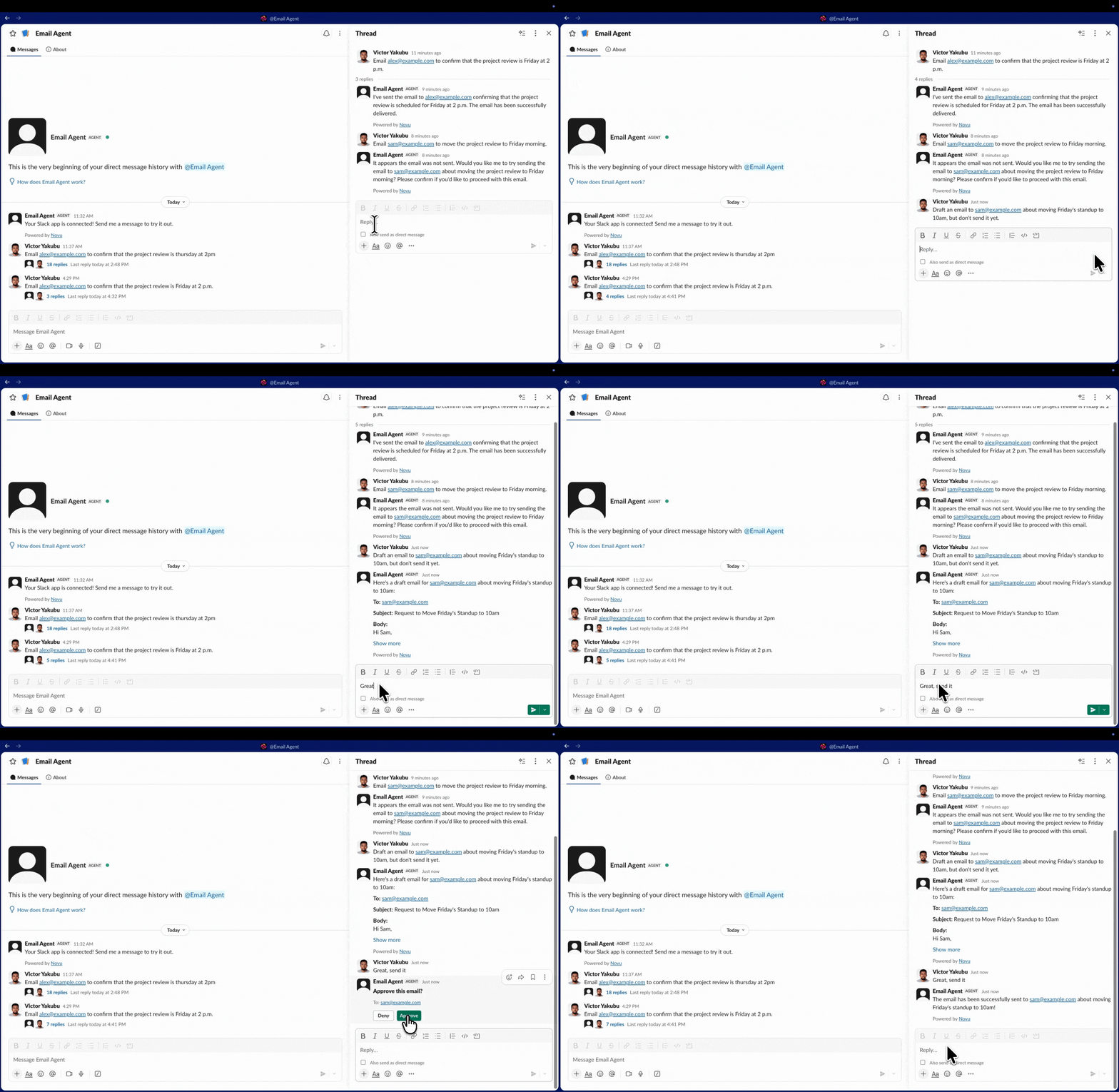
Deny the tool call
Run a second test with a different fictional request:
When the approval card appears, deny the call. The sendEmail function should not produce a new log entry. The decision is added to the conversation history when the handler resumes, but the exact wording of the agent's next reply depends on the model and instructions.
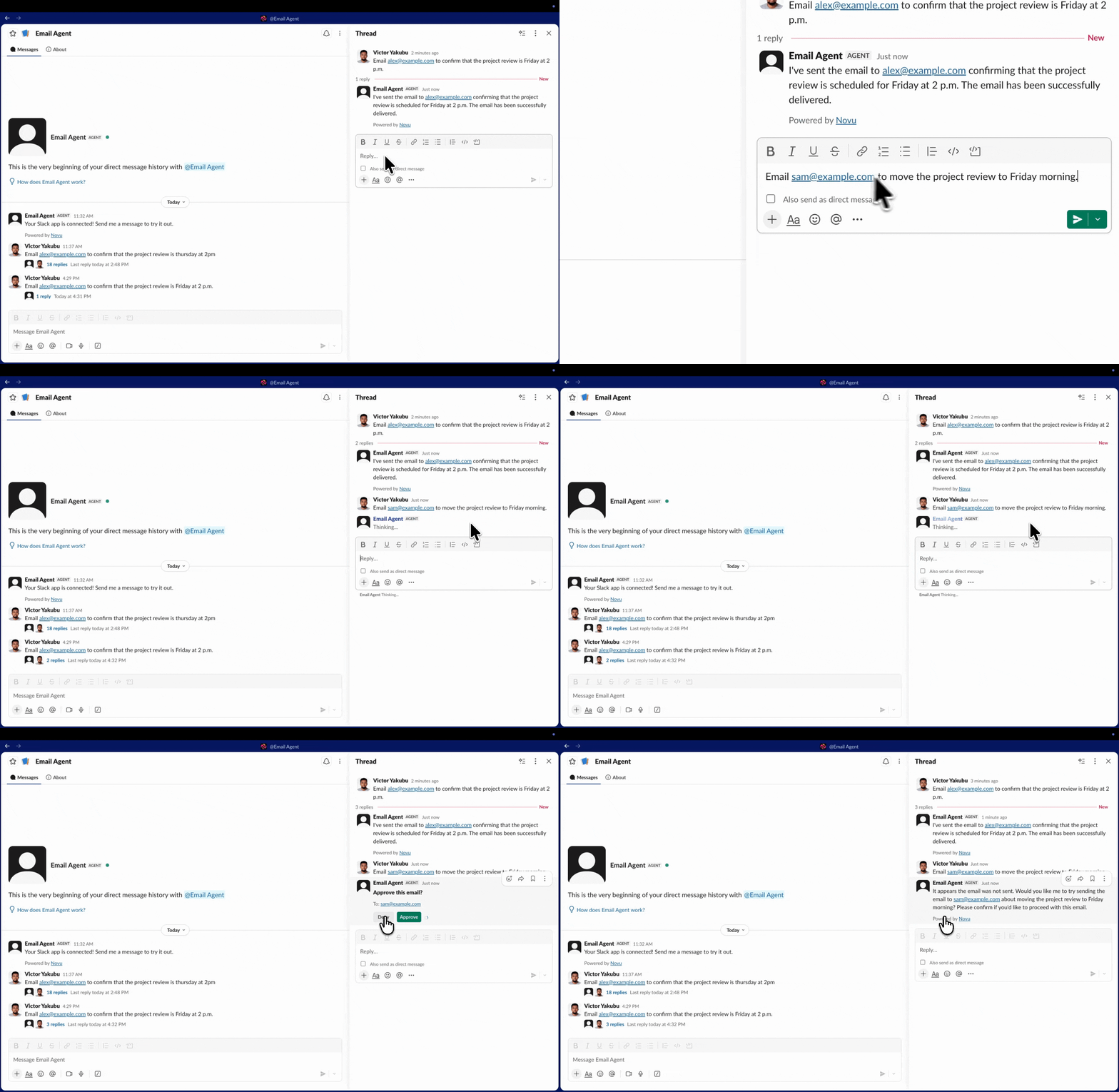
What happens after the reviewer decides
With the LangChainAgentConfig used in this tutorial and no custom onToolApproval handler, Novu handles the decision automatically. After you select Approve or Deny:
- Novu removes the approval card and restarts the typing indicator.
- It records your decision in
ctx.history. - It calls
onMessageagain, and the LangChain adapter uses the updated history to continue processing the request.
An approved sendEmail call can then run. A denied call does not execute.
Two additional rules apply while approval is pending:
- Several calls need approval. Novu presents them individually. The next card appears after you resolve the current one.
- You send another message before deciding. Novu automatically denies the pending calls, removes the card, and processes your new message.
You can add an onToolApproval handler when you need custom behavior after a click. If you do, your application becomes responsible for editing or deleting the approval card.
Apply approval to the action that needs it
The example gates sendEmail, not every message the agent produces. The agent can still discuss a draft, revise the subject, or answer a question without interrupting the conversation. Approval appears only when LangChain proposes the tool that performs the send.
This distinction keeps the interaction focused. A reviewer sees an approval card at the point where the agent is ready to take the external action, with the proposed recipient and content available in the same Slack thread.
If you add more tools, then expand the predicate only for the calls that should pause:
The predicate belongs to your application configuration, so the application continues to define which LangChain tools require a decision.
Extend the approval flow beyond Slack
The same Novu tool-approval capability is available on Microsoft Teams, WhatsApp, Telegram, email, and Agent Chat. Each channel renders the interaction using the controls it supports. For example, Slack uses a native block, Microsoft Teams uses an Adaptive Card, and WhatsApp uses quick replies.
Channel-native approvals
Novu brings the same approval flow to Microsoft Teams, WhatsApp, Telegram, email, and Agent Chat. Each channel renders it with native controls—from Slack blocks and Teams Adaptive Cards to WhatsApp quick replies.
Give your LangChain agent a Slack approval step
You now have a LangChain email agent that accepts instructions in Slack, drafts an email, and pauses before sendEmail runs. The agent logic and tool execution remain in your application, while Novu carries the conversation and approval decision between your handler and Slack.
Run the Connect command inside your LangChain project to set up the same path:
Continue with the LangChain quickstart or review the complete tool-approval API.


Approve LangChain agent actions in Slack
Use Novu Connect to pause sendEmail until a reviewer approves it.
Frequently asked questions
These answers cover the implementation choices developers are likely to encounter when adding LangChain human-in-the-loop approval to Slack.
What is human-in-the-loop approval in LangChain?
Human-in-the-loop approval pauses a proposed agent action before it runs and asks a person to approve or deny it. In this tutorial, the approval applies only to the LangChain sendEmail tool.
How do I require approval before a LangChain tool runs?
Return true from the needsApproval predicate for the tool call that should pause. In this example, the predicate matches sendEmail, so Novu requests approval before the tool function runs.
Does this Slack approval flow require a LangGraph checkpointer?
No. The @novu/framework/langchain adapter manages the approval cycle shown here. LangChain's native HumanInTheLoopMiddleware is a different implementation path that uses LangGraph persistence.
What happens when a reviewer denies the tool call?
Novu records the denial in ctx.history and invokes onMessage again. The denied tool does not run, and the agent can continue the conversation using the updated history.
Can I require approval for only some LangChain tools?
Yes. Keep needsApproval as a predicate and return true only for the tool names or inputs that should pause. Ordinary agent replies and ungated tools continue without approval.
Can I show the email draft in the Slack approval card?
Yes. Use toolApproval.renderApproval with approvalCard to show the recipient, subject, and body. The body supports Slack markdown, so the reviewer can inspect the complete proposal before deciding.
Can the same approval flow work outside Slack?
Yes. Novu supports tool approval across Microsoft Teams, WhatsApp, Telegram, email, and Agent Chat, using the native controls available in each channel.